tape fiasco

VST / AU Plugin

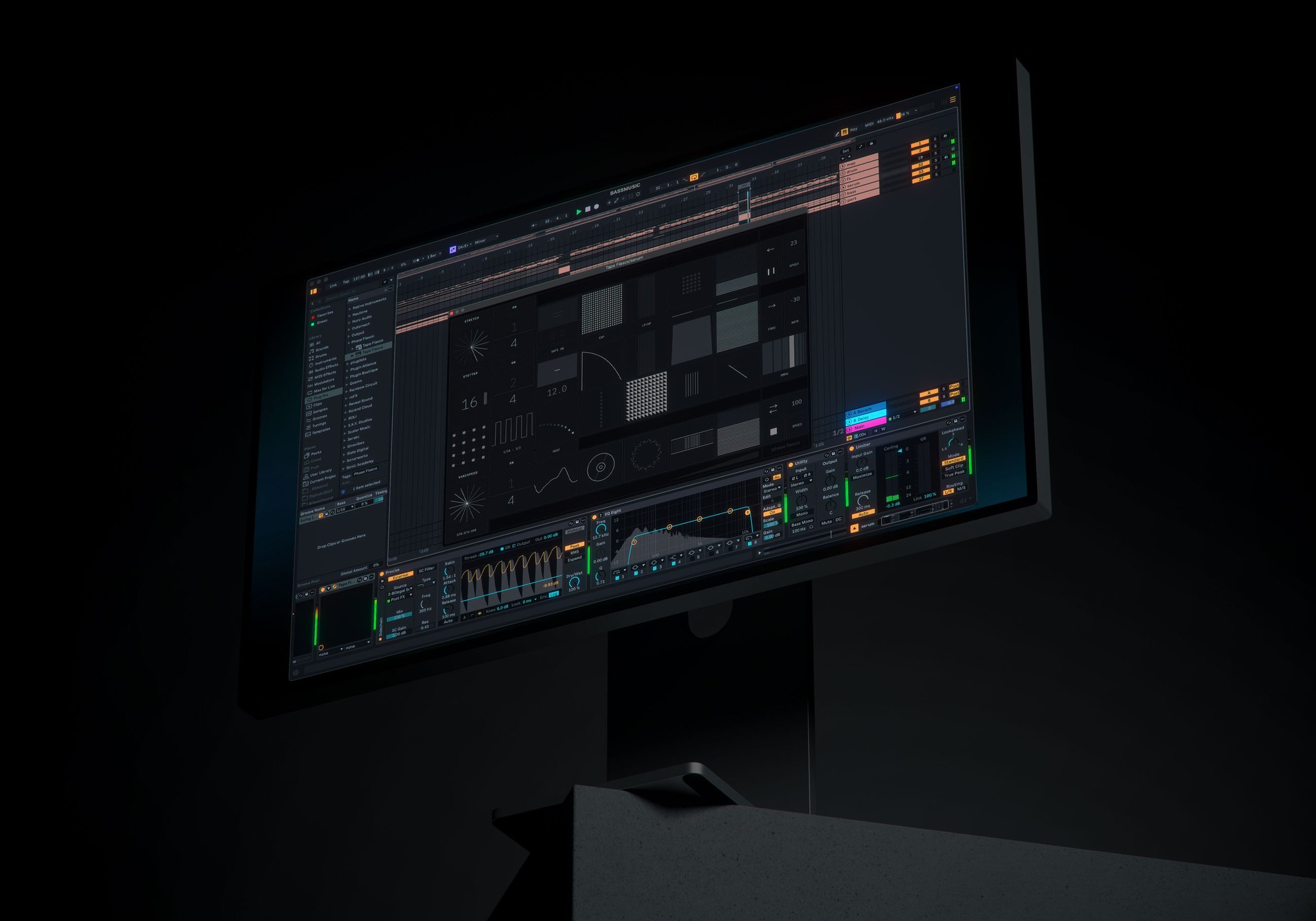
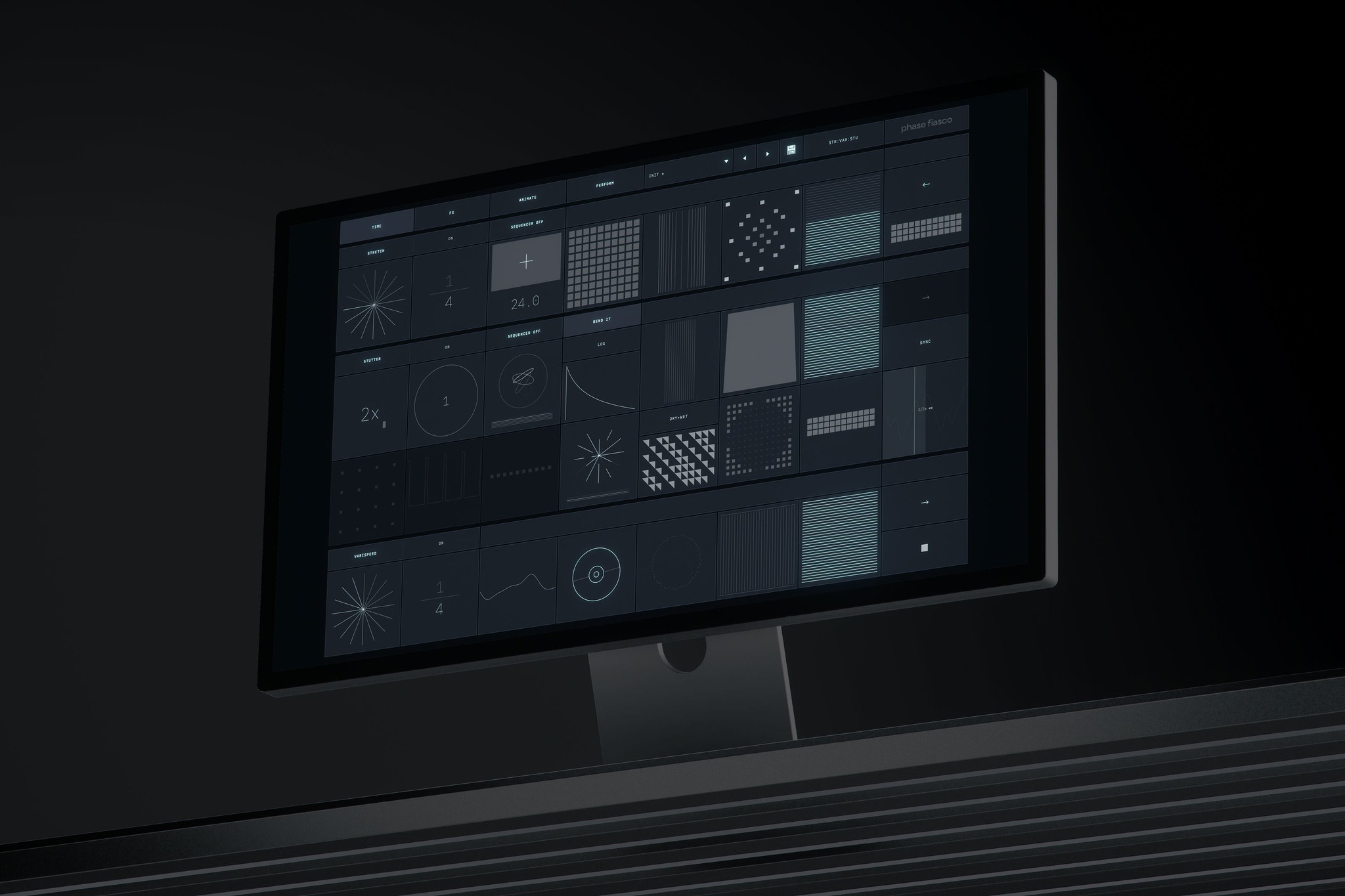
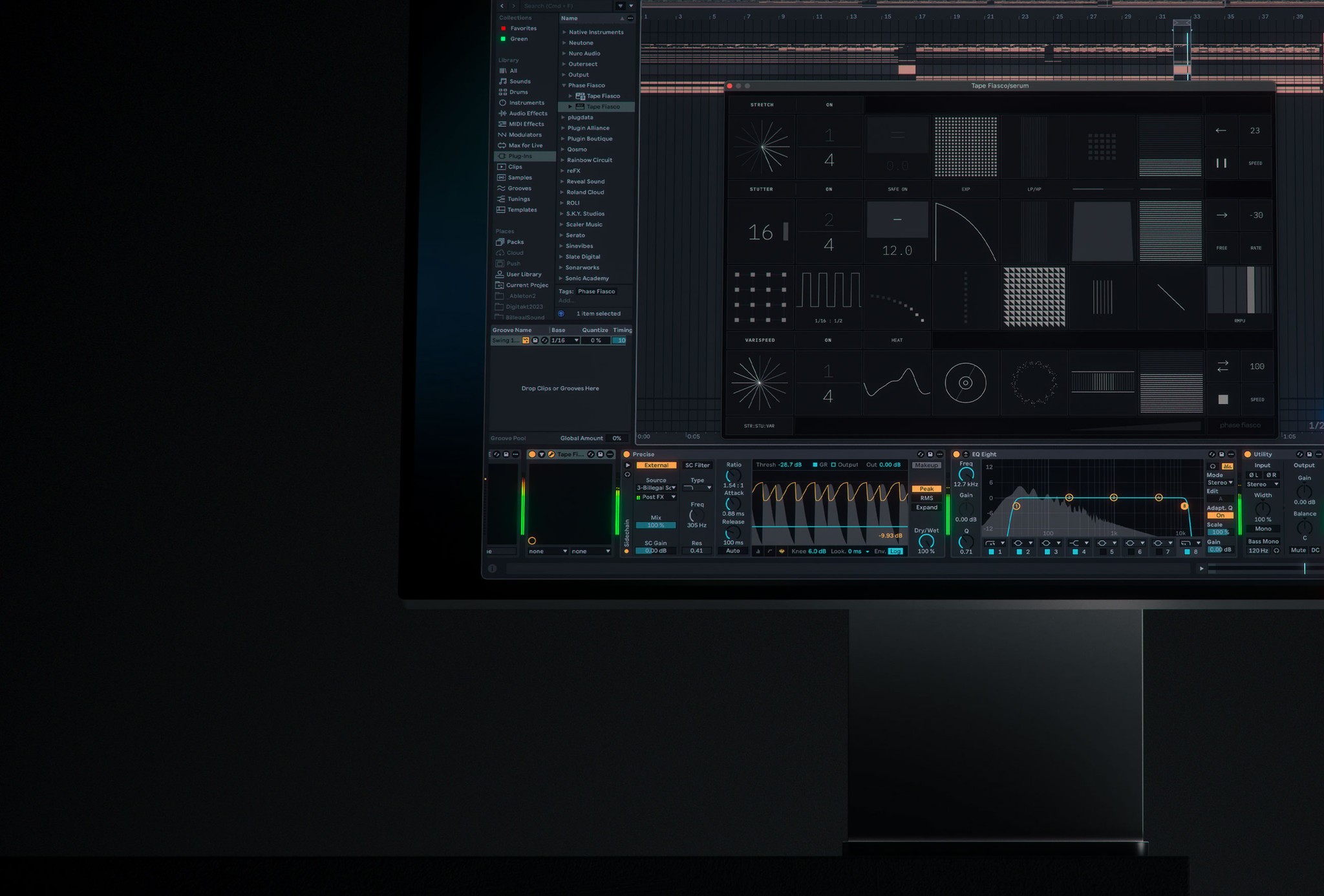
Tape Fiasco is a creative audio effect plugin that combines three distinct time-based effects: Stretch (granular time-stretching), Varispeed (tape-style speed manipulation), and Stutter (rhythmic slicing and repetition). Each effect can be used independently or in combination, with configurable signal routing between them. The plugin is designed for real-time performance and sound design, offering tempo-synced operation, envelope follower modulation, and extensive parameter control for each effect section.

stretch

The Stretch effect is a granular time-stretching processor that captures audio into a buffer and plays it back using overlapping grains, allowing independent control of playback speed and pitch.

Speed
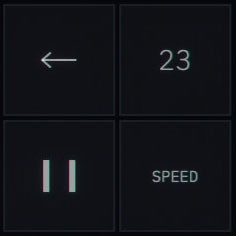
The speed control affects how quickly the read position advances through the grain buffer, creating time-stretch effects without pitch change. - 0%: Playback is frozen at the current position - 50%: Half-speed playback (default) - 100%: Normal speed playback
Speed
The speed control affects how quickly the read position advances through the grain buffer, creating time-stretch effects without pitch change. - 0%: Playback is frozen at the current position - 50%: Half-speed playback (default) - 100%: Normal speed playback
Speed
The speed control affects how quickly the read position advances through the grain buffer, creating time-stretch effects without pitch change. - 0%: Playback is frozen at the current position - 50%: Half-speed playback (default) - 100%: Normal speed playback
Speed
The speed control affects how quickly the read position advances through the grain buffer, creating time-stretch effects without pitch change. - 0%: Playback is frozen at the current position - 50%: Half-speed playback (default) - 100%: Normal speed playback
Tempo
Sets how often new audio is captured into the stretch buffer, synced to host tempo. Longer values capture more audio context; shorter values create more frequent buffer updates.
Tempo
Sets how often new audio is captured into the stretch buffer, synced to host tempo. Longer values capture more audio context; shorter values create more frequent buffer updates.
Tempo
Sets how often new audio is captured into the stretch buffer, synced to host tempo. Longer values capture more audio context; shorter values create more frequent buffer updates.
Tempo
Sets how often new audio is captured into the stretch buffer, synced to host tempo. Longer values capture more audio context; shorter values create more frequent buffer updates.
Pitch
Shifts the pitch of the stretched audio independently of speed. Uses grain-based pitch shifting by adjusting the grain playback rate while maintaining the overall time-stretch behavior.
Pitch
Shifts the pitch of the stretched audio independently of speed. Uses grain-based pitch shifting by adjusting the grain playback rate while maintaining the overall time-stretch behavior.
Pitch
Shifts the pitch of the stretched audio independently of speed. Uses grain-based pitch shifting by adjusting the grain playback rate while maintaining the overall time-stretch behavior.
Pitch
Shifts the pitch of the stretched audio independently of speed. Uses grain-based pitch shifting by adjusting the grain playback rate while maintaining the overall time-stretch behavior.
Grain
Controls the grain generation rate. Higher values create smoother, more continuous sound but may smear transients. Lower values preserve more transient detail but can sound more granular/choppy.
Grain
Controls the grain generation rate. Higher values create smoother, more continuous sound but may smear transients. Lower values preserve more transient detail but can sound more granular/choppy.
Grain
Controls the grain generation rate. Higher values create smoother, more continuous sound but may smear transients. Lower values preserve more transient detail but can sound more granular/choppy.
Grain
Controls the grain generation rate. Higher values create smoother, more continuous sound but may smear transients. Lower values preserve more transient detail but can sound more granular/choppy.
Spread
Stereo spread control that pans alternating grains left and right. At 0%, output is mono-summed. At 100%, grains alternate hard left/right for maximum stereo width.
Spread
Stereo spread control that pans alternating grains left and right. At 0%, output is mono-summed. At 100%, grains alternate hard left/right for maximum stereo width.
Spread
Stereo spread control that pans alternating grains left and right. At 0%, output is mono-summed. At 100%, grains alternate hard left/right for maximum stereo width.
Spread
Stereo spread control that pans alternating grains left and right. At 0%, output is mono-summed. At 100%, grains alternate hard left/right for maximum stereo width.
Scatter
Randomizes grain read positions within the buffer. At 0%, grains play sequentially. Higher values introduce random jumps, creating glitchy, fragmented textures.
Scatter
Randomizes grain read positions within the buffer. At 0%, grains play sequentially. Higher values introduce random jumps, creating glitchy, fragmented textures.
Scatter
Randomizes grain read positions within the buffer. At 0%, grains play sequentially. Higher values introduce random jumps, creating glitchy, fragmented textures.
Scatter
Randomizes grain read positions within the buffer. At 0%, grains play sequentially. Higher values introduce random jumps, creating glitchy, fragmented textures.
Reverse
Toggles reverse grain playback. When enabled, individual grains play backwards while maintaining the overall forward progression through the buffer.
Reverse
Toggles reverse grain playback. When enabled, individual grains play backwards while maintaining the overall forward progression through the buffer.
Reverse
Toggles reverse grain playback. When enabled, individual grains play backwards while maintaining the overall forward progression through the buffer.
Reverse
Toggles reverse grain playback. When enabled, individual grains play backwards while maintaining the overall forward progression through the buffer.
Freeze
Captures the current buffer state and holds it indefinitely, ignoring new input. The frozen buffer continues to be processed by Speed, Pitch, and other parameters.
Freeze
Captures the current buffer state and holds it indefinitely, ignoring new input. The frozen buffer continues to be processed by Speed, Pitch, and other parameters.
Freeze
Captures the current buffer state and holds it indefinitely, ignoring new input. The frozen buffer continues to be processed by Speed, Pitch, and other parameters.
Freeze
Captures the current buffer state and holds it indefinitely, ignoring new input. The frozen buffer continues to be processed by Speed, Pitch, and other parameters.
Envelope Amount
Amount of envelope follower modulation applied to the selected target parameter. Positive values increase the parameter with input level; negative values decrease it.
Envelope Amount
Amount of envelope follower modulation applied to the selected target parameter. Positive values increase the parameter with input level; negative values decrease it.
Envelope Amount
Amount of envelope follower modulation applied to the selected target parameter. Positive values increase the parameter with input level; negative values decrease it.
Envelope Amount
Amount of envelope follower modulation applied to the selected target parameter. Positive values increase the parameter with input level; negative values decrease it.
Envelope Target
Selects which parameter is modulated by the envelope follower: Speed, Tempo, Pitch, Grain, Spread, Scatter, Mix
Envelope Target
Selects which parameter is modulated by the envelope follower: Speed, Tempo, Pitch, Grain, Spread, Scatter, Mix
Envelope Target
Selects which parameter is modulated by the envelope follower: Speed, Tempo, Pitch, Grain, Spread, Scatter, Mix
Envelope Target
Selects which parameter is modulated by the envelope follower: Speed, Tempo, Pitch, Grain, Spread, Scatter, Mix

stutter

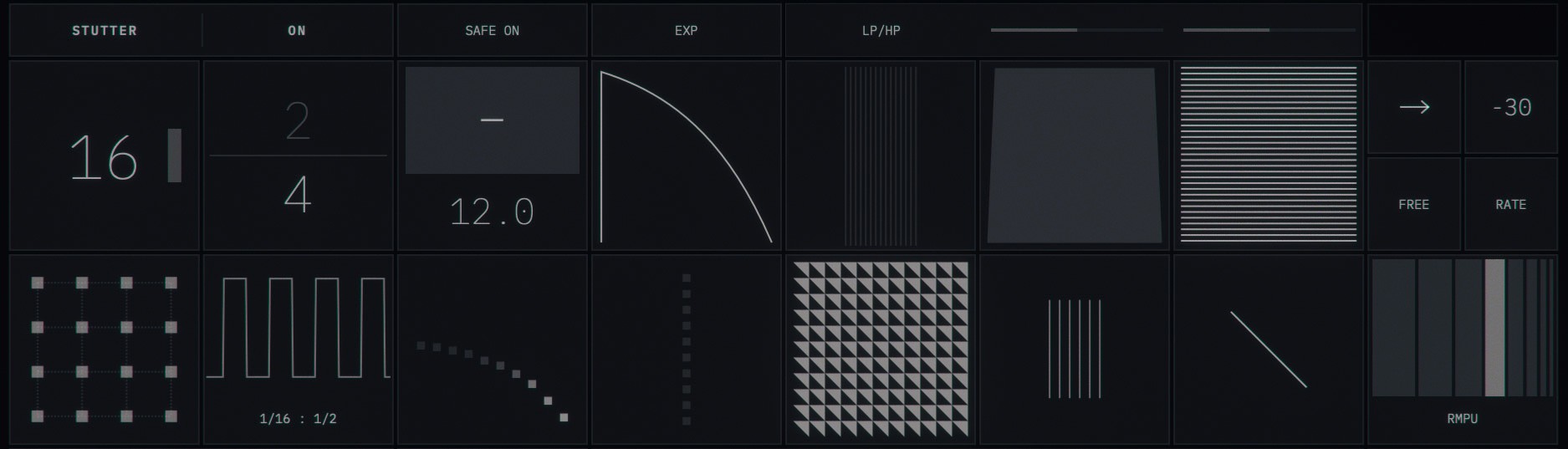
The Stutter effect captures audio slices and repeats them rhythmically, with extensive control over timing, pitch manipulation, filtering, and probability-based variation.
Rate
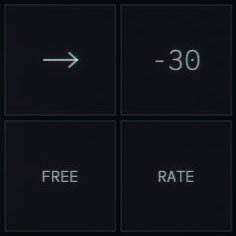
In Sync mode: Selects the note division for stutter slices (1/4, 1/8, 1/16, 1/32, etc.) In Free mode: Sets the slice length in milliseconds (10-500ms) When Sync is on (default), it prevents Rate/Capture combinations that could cause audio glitches or excessive CPU usage.
Rate
In Sync mode: Selects the note division for stutter slices (1/4, 1/8, 1/16, 1/32, etc.) In Free mode: Sets the slice length in milliseconds (10-500ms) When Sync is on (default), it prevents Rate/Capture combinations that could cause audio glitches or excessive CPU usage.
Rate
In Sync mode: Selects the note division for stutter slices (1/4, 1/8, 1/16, 1/32, etc.) In Free mode: Sets the slice length in milliseconds (10-500ms) When Sync is on (default), it prevents Rate/Capture combinations that could cause audio glitches or excessive CPU usage.
Rate
In Sync mode: Selects the note division for stutter slices (1/4, 1/8, 1/16, 1/32, etc.) In Free mode: Sets the slice length in milliseconds (10-500ms) When Sync is on (default), it prevents Rate/Capture combinations that could cause audio glitches or excessive CPU usage.
Capture
How often a new audio slice is captured, synced to host tempo. Shorter capture times create more frequently updating stutters; longer times hold the same slice for extended periods.
Capture
How often a new audio slice is captured, synced to host tempo. Shorter capture times create more frequently updating stutters; longer times hold the same slice for extended periods.
Capture
How often a new audio slice is captured, synced to host tempo. Shorter capture times create more frequently updating stutters; longer times hold the same slice for extended periods.
Capture
How often a new audio slice is captured, synced to host tempo. Shorter capture times create more frequently updating stutters; longer times hold the same slice for extended periods.
Pitch
Pitch shifts each stutter repeat. Applied using sample-rate conversion for clean transposition.
Pitch
Pitch shifts each stutter repeat. Applied using sample-rate conversion for clean transposition.
Pitch
Pitch shifts each stutter repeat. Applied using sample-rate conversion for clean transposition.
Pitch
Pitch shifts each stutter repeat. Applied using sample-rate conversion for clean transposition.
Gate Curve
- Linear: Constant rate volume decay - Log: Fast initial decay, then slow (percussive) - Exp: Slow initial decay, then fast (reverse percussive)
Gate Curve
- Linear: Constant rate volume decay - Log: Fast initial decay, then slow (percussive) - Exp: Slow initial decay, then fast (reverse percussive)
Gate Curve
- Linear: Constant rate volume decay - Log: Fast initial decay, then slow (percussive) - Exp: Slow initial decay, then fast (reverse percussive)
Gate Curve
- Linear: Constant rate volume decay - Log: Fast initial decay, then slow (percussive) - Exp: Slow initial decay, then fast (reverse percussive)
Pan
Stereo alternation of stutter repeats. At 0%, repeats are centered. Higher values alternate repeats between left and right channels.
Pan
Stereo alternation of stutter repeats. At 0%, repeats are centered. Higher values alternate repeats between left and right channels.
Pan
Stereo alternation of stutter repeats. At 0%, repeats are centered. Higher values alternate repeats between left and right channels.
Pan
Stereo alternation of stutter repeats. At 0%, repeats are centered. Higher values alternate repeats between left and right channels.
Smooth
Crossfade time at slice loop points. Higher values create smoother loops but may smear transients. Lower values preserve transients but may cause clicks on non-zero-crossing loops.
Smooth
Crossfade time at slice loop points. Higher values create smoother loops but may smear transients. Lower values preserve transients but may cause clicks on non-zero-crossing loops.
Smooth
Crossfade time at slice loop points. Higher values create smoother loops but may smear transients. Lower values preserve transients but may cause clicks on non-zero-crossing loops.
Smooth
Crossfade time at slice loop points. Higher values create smoother loops but may smear transients. Lower values preserve transients but may cause clicks on non-zero-crossing loops.
Mix
Dry/wet blend for the stutter effect.
Mix
Dry/wet blend for the stutter effect.
Mix
Dry/wet blend for the stutter effect.
Mix
Dry/wet blend for the stutter effect.
Link
Enables preset mode where the Rate control selects from predefined Rate:Capture combinations optimized for musical results.
Link
Enables preset mode where the Rate control selects from predefined Rate:Capture combinations optimized for musical results.
Link
Enables preset mode where the Rate control selects from predefined Rate:Capture combinations optimized for musical results.
Link
Enables preset mode where the Rate control selects from predefined Rate:Capture combinations optimized for musical results.
Pitch Ramp
Cumulative pitch change per repeat. Each successive stutter repeat is pitch-shifted by this additional amount, creating rising or falling pitch patterns.
Pitch Ramp
Cumulative pitch change per repeat. Each successive stutter repeat is pitch-shifted by this additional amount, creating rising or falling pitch patterns.
Pitch Ramp
Cumulative pitch change per repeat. Each successive stutter repeat is pitch-shifted by this additional amount, creating rising or falling pitch patterns.
Pitch Ramp
Cumulative pitch change per repeat. Each successive stutter repeat is pitch-shifted by this additional amount, creating rising or falling pitch patterns.
Gate
Applies a volume envelope to each stutter repeat. Higher values create more pronounced volume ducking at the end of each slice, producing rhythmic gating effects.
Gate
Applies a volume envelope to each stutter repeat. Higher values create more pronounced volume ducking at the end of each slice, producing rhythmic gating effects.
Gate
Applies a volume envelope to each stutter repeat. Higher values create more pronounced volume ducking at the end of each slice, producing rhythmic gating effects.
Gate
Applies a volume envelope to each stutter repeat. Higher values create more pronounced volume ducking at the end of each slice, producing rhythmic gating effects.
Probability
Chance that the stutter effect triggers on each cycle. At 100% (default), stutter always triggers. Lower values create random gaps where dry signal passes through.
Probability
Chance that the stutter effect triggers on each cycle. At 100% (default), stutter always triggers. Lower values create random gaps where dry signal passes through.
Probability
Chance that the stutter effect triggers on each cycle. At 100% (default), stutter always triggers. Lower values create random gaps where dry signal passes through.
Probability
Chance that the stutter effect triggers on each cycle. At 100% (default), stutter always triggers. Lower values create random gaps where dry signal passes through.
Retrigger
Probability of randomly capturing new audio mid-cycle, interrupting the current stutter pattern. Creates unpredictable variations and glitchy textures.
Retrigger
Probability of randomly capturing new audio mid-cycle, interrupting the current stutter pattern. Creates unpredictable variations and glitchy textures.
Retrigger
Probability of randomly capturing new audio mid-cycle, interrupting the current stutter pattern. Creates unpredictable variations and glitchy textures.
Retrigger
Probability of randomly capturing new audio mid-cycle, interrupting the current stutter pattern. Creates unpredictable variations and glitchy textures.
Retrigger
Probability of randomly capturing new audio mid-cycle, interrupting the current stutter pattern. Creates unpredictable variations and glitchy textures.
Retrigger
Probability of randomly capturing new audio mid-cycle, interrupting the current stutter pattern. Creates unpredictable variations and glitchy textures.
Retrigger
Probability of randomly capturing new audio mid-cycle, interrupting the current stutter pattern. Creates unpredictable variations and glitchy textures.
Retrigger
Probability of randomly capturing new audio mid-cycle, interrupting the current stutter pattern. Creates unpredictable variations and glitchy textures.
Pattern
Applies rhythmic variation to stutter timing: - Even: Equal timing for all repeats - Dotted: Long-short alternating pattern (1.5x - 0.5x) - Triplet: 2/3 timing multiplier - Swing: Shuffle feel with alternating timing - Ramp Up: Accelerating repeat rate - Ramp Down: Decelerating repeat rate
Pattern
Applies rhythmic variation to stutter timing: - Even: Equal timing for all repeats - Dotted: Long-short alternating pattern (1.5x - 0.5x) - Triplet: 2/3 timing multiplier - Swing: Shuffle feel with alternating timing - Ramp Up: Accelerating repeat rate - Ramp Down: Decelerating repeat rate
Pattern
Applies rhythmic variation to stutter timing: - Even: Equal timing for all repeats - Dotted: Long-short alternating pattern (1.5x - 0.5x) - Triplet: 2/3 timing multiplier - Swing: Shuffle feel with alternating timing - Ramp Up: Accelerating repeat rate - Ramp Down: Decelerating repeat rate
Pattern
Applies rhythmic variation to stutter timing: - Even: Equal timing for all repeats - Dotted: Long-short alternating pattern (1.5x - 0.5x) - Triplet: 2/3 timing multiplier - Swing: Shuffle feel with alternating timing - Ramp Up: Accelerating repeat rate - Ramp Down: Decelerating repeat rate
Filter
The cutoff frequency sweeps based on this value. LP/HP Mode: - Standard resonant lowpass/highpass filter - Filter A = Resonance (0-100%) - Filter B = Drive (0-100%) Formant Mode: - Vowel-like formant filter using parallel bandpass filters - Filter A = Q/Resonance (0-100%) - Filter B = Formant Shift (-100% to +100%, mapped from 0-100%) Comb Mode: - Comb filter for flanging/metallic effects - Filter A = Feedback (0-100%) - Filter B = Damping (0-100%)
Filter
The cutoff frequency sweeps based on this value. LP/HP Mode: - Standard resonant lowpass/highpass filter - Filter A = Resonance (0-100%) - Filter B = Drive (0-100%) Formant Mode: - Vowel-like formant filter using parallel bandpass filters - Filter A = Q/Resonance (0-100%) - Filter B = Formant Shift (-100% to +100%, mapped from 0-100%) Comb Mode: - Comb filter for flanging/metallic effects - Filter A = Feedback (0-100%) - Filter B = Damping (0-100%)
Filter
The cutoff frequency sweeps based on this value. LP/HP Mode: - Standard resonant lowpass/highpass filter - Filter A = Resonance (0-100%) - Filter B = Drive (0-100%) Formant Mode: - Vowel-like formant filter using parallel bandpass filters - Filter A = Q/Resonance (0-100%) - Filter B = Formant Shift (-100% to +100%, mapped from 0-100%) Comb Mode: - Comb filter for flanging/metallic effects - Filter A = Feedback (0-100%) - Filter B = Damping (0-100%)
Filter
The cutoff frequency sweeps based on this value. LP/HP Mode: - Standard resonant lowpass/highpass filter - Filter A = Resonance (0-100%) - Filter B = Drive (0-100%) Formant Mode: - Vowel-like formant filter using parallel bandpass filters - Filter A = Q/Resonance (0-100%) - Filter B = Formant Shift (-100% to +100%, mapped from 0-100%) Comb Mode: - Comb filter for flanging/metallic effects - Filter A = Feedback (0-100%) - Filter B = Damping (0-100%)
Reverse
Plays each stutter slice backwards while maintaining the overall rhythm.
Reverse
Plays each stutter slice backwards while maintaining the overall rhythm.
Reverse
Plays each stutter slice backwards while maintaining the overall rhythm.
Reverse
Plays each stutter slice backwards while maintaining the overall rhythm.
Envelope Amount
Envelope follower modulation amount.
Envelope Amount
Envelope follower modulation amount.
Envelope Amount
Envelope follower modulation amount.
Envelope Amount
Envelope follower modulation amount.
Sync
When enabled (default), the Rate parameter snaps to tempo-synced note divisions. When disabled, Rate operates in free milliseconds mode.
Sync
When enabled (default), the Rate parameter snaps to tempo-synced note divisions. When disabled, Rate operates in free milliseconds mode.
Sync
When enabled (default), the Rate parameter snaps to tempo-synced note divisions. When disabled, Rate operates in free milliseconds mode.
Sync
When enabled (default), the Rate parameter snaps to tempo-synced note divisions. When disabled, Rate operates in free milliseconds mode.
Envelope Target
Modulation destination: Rate, Capture, Pitch, Gate, Pan, Smooth, Mix, Ramp (Pitch Ramp), Decay, Prob (Probability), Retrig (Retrigger), Filter
Envelope Target
Modulation destination: Rate, Capture, Pitch, Gate, Pan, Smooth, Mix, Ramp (Pitch Ramp), Decay, Prob (Probability), Retrig (Retrigger), Filter
Envelope Target
Modulation destination: Rate, Capture, Pitch, Gate, Pan, Smooth, Mix, Ramp (Pitch Ramp), Decay, Prob (Probability), Retrig (Retrigger), Filter
Envelope Target
Modulation destination: Rate, Capture, Pitch, Gate, Pan, Smooth, Mix, Ramp (Pitch Ramp), Decay, Prob (Probability), Retrig (Retrigger), Filter

varispeed

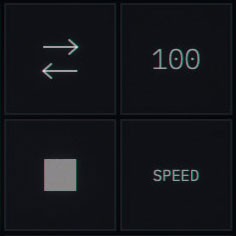
The Varispeed effect emulates tape machine speed manipulation, including wow/flutter modulation, tape stop effects, scratch control, and analog-style saturation/compression.

Speed
Controls the tape playback speed. - 0%: Tape stopped - 100%: Normal speed (default) Lower values create pitch-down slowdown effects characteristic of tape machines.
Speed
Controls the tape playback speed. - 0%: Tape stopped - 100%: Normal speed (default) Lower values create pitch-down slowdown effects characteristic of tape machines.
Speed
Controls the tape playback speed. - 0%: Tape stopped - 100%: Normal speed (default) Lower values create pitch-down slowdown effects characteristic of tape machines.
Tempo
Sets how often new audio is captured into the varispeed buffer, synced to host tempo.
Tempo
Sets how often new audio is captured into the varispeed buffer, synced to host tempo.
Tempo
Sets how often new audio is captured into the varispeed buffer, synced to host tempo.
Wow/Flutter
Adds tape-style pitch modulation simulating mechanical irregularities in tape transport. Uses dual LFOs at different rates to create the characteristic warble of vintage tape machines.
Wow/Flutter
Adds tape-style pitch modulation simulating mechanical irregularities in tape transport. Uses dual LFOs at different rates to create the characteristic warble of vintage tape machines.
Wow/Flutter
Adds tape-style pitch modulation simulating mechanical irregularities in tape transport. Uses dual LFOs at different rates to create the characteristic warble of vintage tape machines.
Scratch
DJ-style scratch control. Acts as a real-time pitch bend: - -100%: Maximum pitch down - 0%: No pitch change (center) - +100%: Maximum pitch up The parameter smoothly returns to center when released.
Scratch
DJ-style scratch control. Acts as a real-time pitch bend: - -100%: Maximum pitch down - 0%: No pitch change (center) - +100%: Maximum pitch up The parameter smoothly returns to center when released.
Scratch
DJ-style scratch control. Acts as a real-time pitch bend: - -100%: Maximum pitch down - 0%: No pitch change (center) - +100%: Maximum pitch up The parameter smoothly returns to center when released.
Saturation/Bitcrush
Adds harmonic distortion to the signal. The character depends on the Distort Type setting. - Heat: Warm tape-style saturation with soft-knee compression characteristics - Bitcrush: Digital bit-reduction distortion for lo-fi effects
Saturation/Bitcrush
Adds harmonic distortion to the signal. The character depends on the Distort Type setting. - Heat: Warm tape-style saturation with soft-knee compression characteristics - Bitcrush: Digital bit-reduction distortion for lo-fi effects
Saturation/Bitcrush
Adds harmonic distortion to the signal. The character depends on the Distort Type setting. - Heat: Warm tape-style saturation with soft-knee compression characteristics - Bitcrush: Digital bit-reduction distortion for lo-fi effects
Compression
Applies dynamic range compression to the varispeed output. Higher values increase the compression ratio and makeup gain, creating a more squashed, punchy sound.
Compression
Applies dynamic range compression to the varispeed output. Higher values increase the compression ratio and makeup gain, creating a more squashed, punchy sound.
Compression
Applies dynamic range compression to the varispeed output. Higher values increase the compression ratio and makeup gain, creating a more squashed, punchy sound.
Mix
Dry/wet blend for the varispeed effect.
Mix
Dry/wet blend for the varispeed effect.
Mix
Dry/wet blend for the varispeed effect.
Play Direction
- Forward: Normal playback direction - Fwd-Rev: Alternates between forward and reverse on each capture cycle - Reverse: Continuous reverse playback
Play Direction
- Forward: Normal playback direction - Fwd-Rev: Alternates between forward and reverse on each capture cycle - Reverse: Continuous reverse playback
Play Direction
- Forward: Normal playback direction - Fwd-Rev: Alternates between forward and reverse on each capture cycle - Reverse: Continuous reverse playback
Stop
Tape stop effect. When held, simulates the sound of a tape machine slowing to a stop. Release to resume normal playback with a spin-up effect.
Stop
Tape stop effect. When held, simulates the sound of a tape machine slowing to a stop. Release to resume normal playback with a spin-up effect.
Stop
Tape stop effect. When held, simulates the sound of a tape machine slowing to a stop. Release to resume normal playback with a spin-up effect.
Envelope Amount
Envelope follower modulation amount for the selected target.
Envelope Amount
Envelope follower modulation amount for the selected target.
Envelope Amount
Envelope follower modulation amount for the selected target.
Envelope Target
Selects the modulation destination: Speed, Tempo, W/Fltr (Wow/Flutter), Scratch, Sat (Saturation), Compr (Compress), Mix
Envelope Target
Selects the modulation destination: Speed, Tempo, W/Fltr (Wow/Flutter), Scratch, Sat (Saturation), Compr (Compress), Mix
Envelope Target
Selects the modulation destination: Speed, Tempo, W/Fltr (Wow/Flutter), Scratch, Sat (Saturation), Compr (Compress), Mix

varispeed

The Varispeed effect emulates tape machine speed manipulation, including wow/flutter modulation, tape stop effects, scratch control, and analog-style saturation/compression.

Speed
Controls the tape playback speed. - 0%: Tape stopped - 100%: Normal speed (default) Lower values create pitch-down slowdown effects characteristic of tape machines.
Tempo
Sets how often new audio is captured into the varispeed buffer, synced to host tempo.
Wow/Flutter
Adds tape-style pitch modulation simulating mechanical irregularities in tape transport. Uses dual LFOs at different rates to create the characteristic warble of vintage tape machines.
Scratch
DJ-style scratch control. Acts as a real-time pitch bend: - -100%: Maximum pitch down - 0%: No pitch change (center) - +100%: Maximum pitch up The parameter smoothly returns to center when released.
Saturation/Bitcrush
Adds harmonic distortion to the signal. The character depends on the Distort Type setting. - Heat: Warm tape-style saturation with soft-knee compression characteristics - Bitcrush: Digital bit-reduction distortion for lo-fi effects
Compression
Applies dynamic range compression to the varispeed output. Higher values increase the compression ratio and makeup gain, creating a more squashed, punchy sound.
Mix
Dry/wet blend for the varispeed effect.
Play Direction
- Forward: Normal playback direction - Fwd-Rev: Alternates between forward and reverse on each capture cycle - Reverse: Continuous reverse playback
Stop
Tape stop effect. When held, simulates the sound of a tape machine slowing to a stop. Release to resume normal playback with a spin-up effect.
Envelope Amount
Envelope follower modulation amount for the selected target.
Envelope Target
Selects the modulation destination: Speed, Tempo, W/Fltr (Wow/Flutter), Scratch, Sat (Saturation), Compr (Compress), Mix
Free Download
Free Download
MacOS
VST3 / AU
MacOS
VST3 / AU
Windows (not tested)
VST3
Windows (not tested)
VST3
Only tested on Ableton Live 12.2 (Mac OSX Sequoia 15.1)
This plugin is not notarized by Apple. MacOS may show a warning
saying the plugin "is damaged" or "can't be opened."

To fix this, open Terminal and run these commands:

xattr -cr "/Library/Audio/Plug-Ins/VST3/Tape Fiasco.vst3"
xattr -cr "/Library/Audio/Plug-Ins/Components/Tape Fiasco.component"

Then rescan plugins in your DAW.
This plugin is not notarized by Apple. MacOS may show a warning
saying the plugin "is damaged" or "can't be opened."

To fix this, open Terminal and run these commands:

xattr -cr "/Library/Audio/Plug-Ins/VST3/Tape Fiasco.vst3"
xattr -cr "/Library/Audio/Plug-Ins/Components/Tape Fiasco.component"

Then rescan plugins in your DAW.